 Limits Monitor
Know your Claude Code limit before it stops you.
Session, weekly and per-model quota — with burn rate, reset countdown and what it cost. In your menu bar.
macOS 14 or newer · Claude Code CLI · Claude Pro or Max
- No sign-in, ever
- No server in between
- Free — nothing locked
The limit arrives mid-thought.
Five-hour sessions and the weekly quota run independently, and you find out about both at the moment Claude Code stops answering. What burned the quota, and what it cost, isn't visible at all.
The number is already on screen.
The percentage sits in your menu bar and changes shape at 80 % and 95 %. Burn rate becomes a time: −5.2 %/h, empty at 19:40 — or “reset comes first”, when that's the truth. And the history shows which repository cost what.
Eight states, one glance
The icon carries status by shape, not colour alone: normal, 80 %, 95 %, exhausted, stale, offline, no access, demo — eight states you can tell apart. Ring, ticks or dot, your choice, and it reads correctly on both a light and a dark menu bar.
Time, not just a percentage
Burn rate is turned into a time of exhaustion. When the reset arrives first, the app says so instead of inventing a frightening hour. Notifications fire at 80 % and 95 % of the session and 80 % of the week — each one once per limit window.
Where the money actually went
Cost is computed from your local logs against date-aware rates, then broken down by project, model and token type. Most people discover that three quarters of the money is cache reads.
It tells you when it can't tell you
Every number carries its source and its age — read from the API, or computed on this Mac. When the connection drops the number doesn't fall to zero, it is demoted: dashed outline, the time of the last reading, the countdown stopped. A separate banner appears when the problem is on Anthropic's side, so someone else's outage never looks like your quota running out.
Make it read the way you think
Three layouts — instrument, dense, calm — four palettes, three glyph styles, a menu bar mode and desktop widgets. Switching is instant; it's one component set throughout.
A gauge that goes quiet is useless. A gauge that lies is worse.
Watch what happens when it loses the connection.
Flip the switch — the connection to the API drops.
Still 33 %. It just can't confirm it right now.
It never had a reading. It shows zero anyway.
A gauge that goes quiet is useless. A gauge that lies is worse.
See what the app actually reads →How it works
- 01
Launch it
It finds the credentials the Claude Code CLI already created. No password, no account.
- 02
Point it at your logs (optional)
Read access to ~/.claude turns on history and cost. Live monitoring works without it.
- 03
Keep working
It warns you at 80 % and 95 %, and tells you when the limit resets.
What it reads, and what it doesn't
Answers written the way the app behaves.
+Does it need my Claude password?
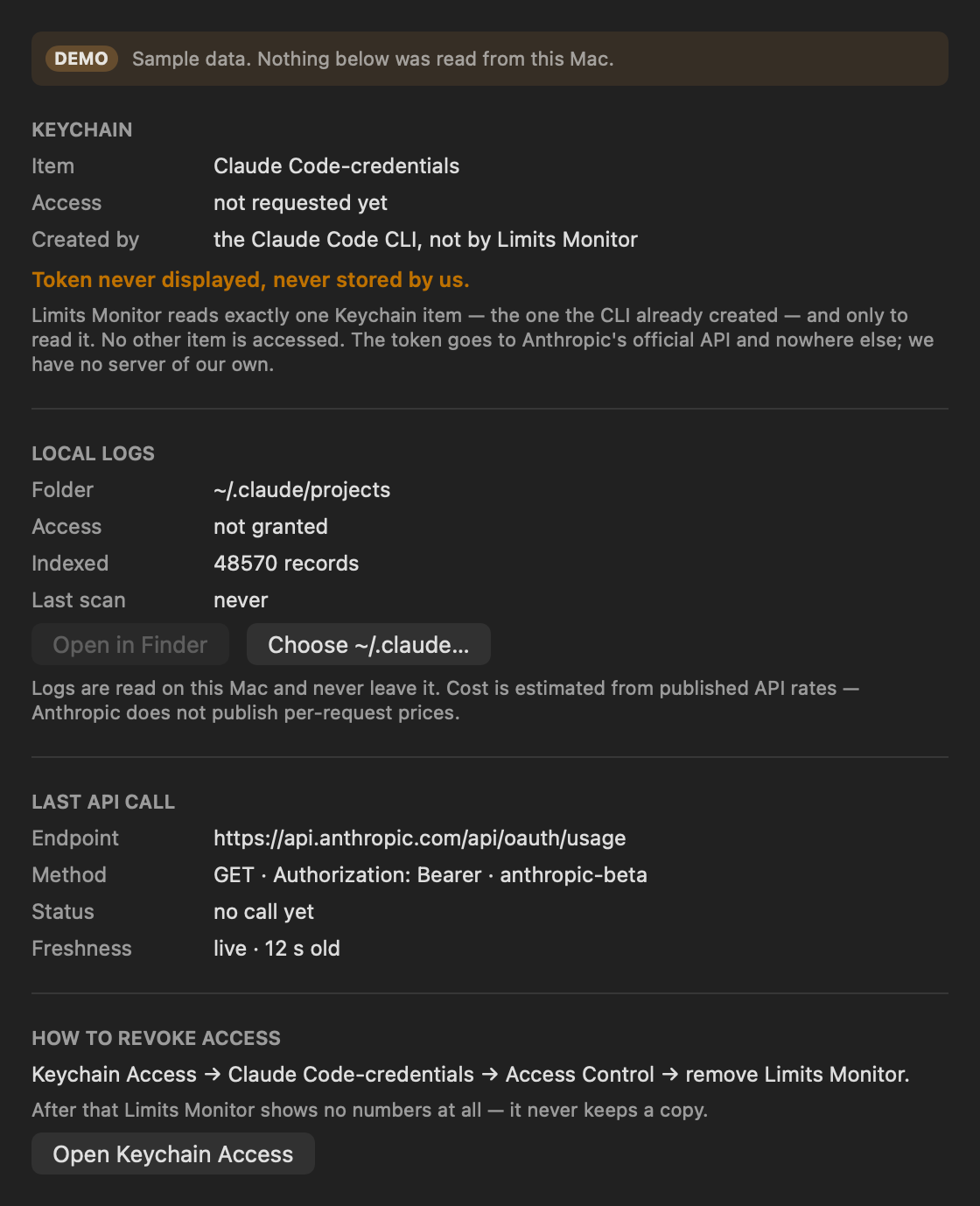
No. It never asks you to sign in. It reads the single Keychain item the Claude Code CLI already created, read-only, and sends that token only to Anthropic's official API. No other Keychain item is touched.
+What exactly does it read?
One Keychain item, and — only if you grant it — your local ~/.claude logs, to compute cost history. A built-in inspector shows exactly what was read and from which address, with the address taken from the running code rather than typed into a string.
+Does anything leave my Mac?
Only the token, and only to api.anthropic.com. There is no server of ours in between, no analytics and no account. You can revoke access in Keychain Access at any time, and the app keeps no copy.
+Can I try it without Claude Code?
Yes. Demo mode explores the whole interface on sample data, and every screen is labelled as demo while you're in it — including the inspector.
+Is it really free?
Yes. There are no in-app purchases and no locked features. Everything described on this page is in the free app.
+Why is the first launch slow?
It indexes your existing logs once. On a real 2.5 GB log — 721 files, 48,860 records — that first pass took 310 seconds. Every scan after it takes about half a second, because 720 of the 721 files are skipped without being read.
+What does it run on?
macOS 14 or newer. It needs the Claude Code CLI and a Claude Pro or Max plan — it reads the limits of the plan you already have.
+Is this made by Anthropic?
No. It's an independent, unofficial app, not created by, affiliated with, endorsed by or sponsored by Anthropic. “Claude” and “Claude Code” are trademarks of Anthropic, PBC, used here only to describe compatibility.
An unretouched screenshot: every item the app read, and the address it was read from, taken from the running code.
Stop finding out the hard way.
Free. No account. macOS 14 or newer.